A First Look at iptables
Introduction
iptables is a Linux userspace network tool used to set up, maintain, and inspect IP packet filtering rules. It doesn’t do the actual work itself, though — that’s done by the netfilter framework in the kernel.
netfilter
Many people think iptables does the packet filtering — it doesn’t. The filtering is actually implemented by netfilter, a network subsystem inside the Linux kernel. It predefines several hooks in the network stack, so packets can be intercepted at each key point along the way. iptables is more like a messenger: you configure rules on the command line, and it relays them to netfilter in the kernel.
Basic Concepts
Tables
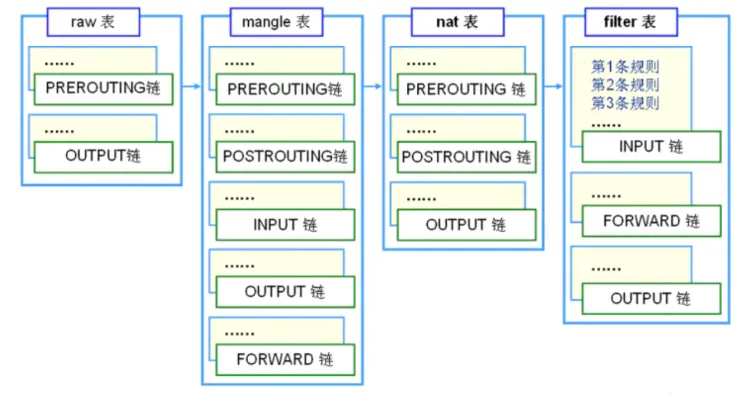
With too many rules things get messy, so iptables uses tables to categorize rules by function. There are four commonly used tables: raw, mangle, nat, and filter. If several tables’ rules are attached to the same chain, they execute in this order: raw → mangle → nat → filter.
raw
Determines whether a packet goes through connection tracking. To exempt certain packets from tracking, combine with the NOTRACK target here. Kernel module: iptable_raw.
mangle
As the name suggests, it “mangles” packets — modifying fields like Type of Service (TOS), TTL, and firewall marks (MARK). Combined with policy routing it can also implement QoS. Kernel module: iptable_mangle.
nat
Used for network address translation (NAT) — rewriting a packet’s source address/port (SNAT) or destination address/port (DNAT). It’s what makes your home router’s internet sharing work. Kernel module: iptable_nat.
filter
The most commonly used table; it does the core “filtering” job. After a rule matches, you can choose to ACCEPT, DROP, or REJECT the packet. Kernel module: iptable_filter.
Chains
Chains correspond to the hook points mentioned above — think of them as “checkpoints” along a packet’s path. There are five built-in chains: PREROUTING, INPUT, FORWARD, OUTPUT, POSTROUTING. Each chain holds multiple rules in order, like a checklist: when a packet arrives, it’s checked against each rule; if one matches, the rule’s action is applied; if none match, the chain’s default policy is used.
PREROUTING
Packets pass through here right after arriving, before any routing decision is made. For every packet entering the host, this is the first stop.
INPUT
After routing decides the packet is destined for this host, it goes through the INPUT chain; once allowed, it’s handed to the application above.
FORWARD
Packets that merely pass through this host and need to be forwarded elsewhere go through the FORWARD chain.
OUTPUT
Packets the host itself sends out go through the OUTPUT chain.
POSTROUTING
After routing is decided and just before the packet leaves the host, it passes through the POSTROUTING chain last.
Tables and Chains
Tables and chains have a many-to-many relationship — a table can contain several chains, and a chain can appear in several tables. It sounds confusing, but the picture makes it clear:
Packet Flow
Putting these chains together, the full path of a packet from arrival to departure looks like this: first the PREROUTING chain, then a routing decision, then one of two cases:
- Destination is this host: go through the INPUT chain and, once allowed, hand the packet to the application; after the application finishes, the reply goes back out through OUTPUT and POSTROUTING in turn.
- Destination is elsewhere: go through the FORWARD chain, then out through POSTROUTING.
All of this assumes the rules don’t drop or reject the packet along the way — otherwise it never makes it.
Related Commands
That’s the gist of the concepts. Finally, let’s look at what the command looks like:
iptables [-t table] command [chain] [match conditions] [-j target]Explanation:
- Table, chain: which table and chain to operate on. If
-tis omitted, the filter table is used by default. - Command: what to do with the rules, e.g. insert, append, delete, list, and so on.
- Match conditions: what kind of packet counts as a match, e.g. filtering by source IP, port, or protocol.
- Target: what to do when matched — ACCEPT, REJECT, DROP, or jump to another custom chain to continue.
That’s all for now; the nitty-gritty of managing rules will have to wait for the next post.